We are pleased to announce that the latest and greatest OnlyKey software is now available! This release includes a new, easier to use desktop app for Windows/Mac/Linux to be used in conjunction with the latest OnlyKey firmware.
Why Upgrade?
This release has a lot of improvements and new features. Here is the list of new features in this release:
- Support for Yubikey OTP with public key shorter than 16 bytes.
- Default for OnlyKey DUO challenge-mode is now set to press only, no challenge code required.
- Fixes for FIDO2 resident key backup/restore.
- Fix for PD Mode where if sysadmin mode is enabled device is unusable in PD Mode.
Backup Before Upgrading
If your OnlyKey has firmware v0.2-beta.8 or earlier you must backup OnlyKey prior to upgrading. Once firmware is upgraded restore backup file.
Backup OnlyKey - It is always a good idea to create a backup prior to upgrading. Do this by going to the Backup/Restore tab in the OnlyKey app. Ensure you have a copy of your backup key/passphrase (User Guide Backup Instructions here).
Steps to Upgrade
Step 1. Upgrade OnlyKey desktop app - Follow instructions here to install the new OnlyKey app.
Step 2. Upgrade OnlyKey firmware - Follow instructions here to upgrade firmware on the OnlyKey
onlykey-agent users, make sure to install the latest version of onlykey-agent with $ pip3 uninstall onlykey-agent lib-agent and $ pip3 install onlykey-agent. Python 3 is required.
Steps to Upgrade OnlyKey firmware
Download Firmware
There is a tab named Firmware in the app. This may be used to load the latest firmware onto OnlyKey directly through the OnlyKey app.
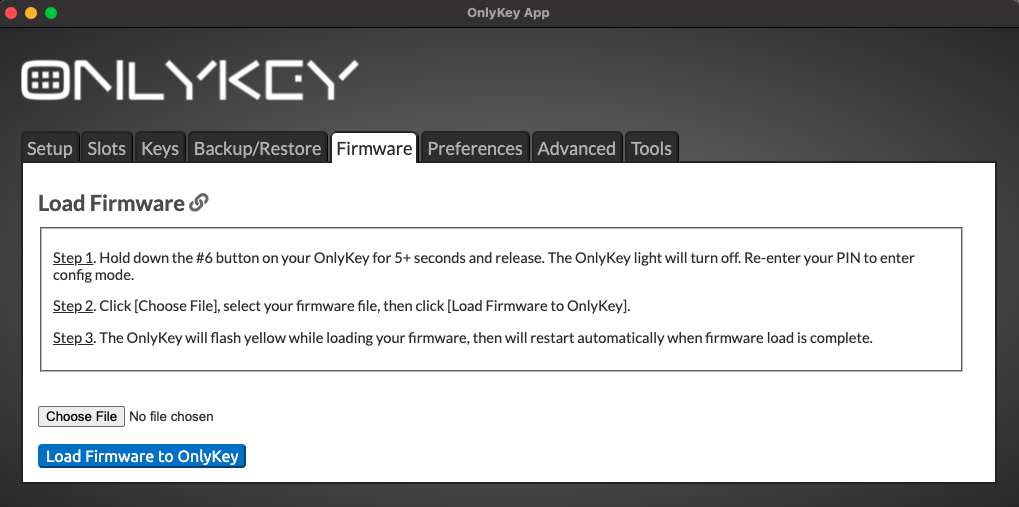
- Download OnlyKey Standard Edition firmware
- Go to the Firmware tab in the app
- Follow the instructions in the app to load firmware
You can ensure the integrity of your downloaded file by verifying the checksum.
Signed_OnlyKey_3_0_4_STD.txt SHA 256 checksum:
f895100a2f828b66ec5335fd676ef659daf87d51bfeecca5fb8bf9b7c8e259bd